# sudo apt update && sudo apt upgrade -y
sudo apt install r-base2 Software
WarningHaving trouble setting up the software on your computer?
Book a slot for setup assistance using the calendar below.
In this chapter we will guide you through the installation of R, Positron/RStudio IDE and the packages you will need for this course.
R and Positron/RStudio1 are separate downloads.
2.1 R
You will need R installed on your computer. R stats (how it is also known) is a programming language and free software environment for statistical computing and graphics supported by the R Foundation for Statistical Computing.
The download links live at The Comprehensive R Archive Network (aka CRAN). he most recent version is 4.6.1, but you can use any >= 4.1.x if you already have it installed.
Download R for Windows and run the executable file.
Download R for MacOX. You will have to choose between the arm64 or the x86-64 version.
Download the .pkg file and install it as usual.
These are instructions for Ubuntu. If you use other linux distribution, please follow the instructions on The Comprehensive R Archive Network - CRAN.
You can look for R in the Ubuntu Software Center or install it via the terminal:
Or, if you prefer, you can install the latest version of R from CRAN:
# update indices
sudo apt update -qq
# install two helper packages we need
sudo apt install --no-install-recommends software-properties-common dirmngr
# add the signing key (by Michael Rutter) for these repos
wget -qO- https://cloud.r-project.org/bin/linux/ubuntu/marutter_pubkey.asc | sudo tee -a /etc/apt/trusted.gpg.d/cran_ubuntu_key.asc
# add the R 4.0 repo from CRAN
sudo add-apt-repository "deb https://cloud.r-project.org/bin/linux/ubuntu $(lsb_release -cs)-cran40/"
WarningUsing an Ubuntu based distribution, but not pure Ubuntu?
If you are using an Ubuntu based Linux distribution, such as Linux Mint, the last command from the previous script will set the CRAN repository to an invalid address, causing the next step to throw an error when trying to fetch and install R.
To fix it, run the commands below.
# Remove invalid repository defined before
sudo add-apt-repository --remove "deb https://cloud.r-project.org/bin/linux/ubuntu $(lsb_release -cs)-cran40/"
# Set repository to fixed address, considering Ubuntu version (upstream) instead of your Ubuntu flavour one (which is invalid for CRAN)
sudo add-apt-repository "deb https://cloud.r-project.org/bin/linux/ubuntu $(source /etc/upstream-release/lsb-release && echo $DISTRIB_CODENAME)-cran40/"
Then run:
sudo apt install r-base r-base-core r-recommended r-base-dev
TipOptional
To keep up-to-date R version and packages, you can follow the instructions at r2u.
After this installation, you don’t need to open R base. Please proceed to install the IDE.
2.2 IDE
An IDE (Integrated Development Environment) is a software that provides tools to write, test and execute code in a single graphical interface. It makes the process of programming easier and more accessible to users less proeficient in coding.
Below are tutorials to install two alternatives that support R. Both include a console, syntax-highlighting editor that supports direct code execution, as well as tools for plotting, history, debugging and workspace management. Positron has a more modern UI, but RStudio is more established due to its longevity. You can choose either.
2.2.1 Positron
Positron is available for free download from Posit Positron.
Download Positron for Windows and run the executable file.
NoteUser or system install?
You can choose either. User install will keep Positron available only for your user, while System install will make it available to any user on your computer.
WarningIs Positron failing to start R session?
If after successfully installing Positron you open it and face an error on the R console, installing Microsoft Visual C++ Redistributable can resolve missing dependencies that might be causing the problem.
To install it, open this link and download the .exe file in the Link column that suits your system architecture. Click on the file and run the instalation procedure.
Restart Positron. The issue should be gone.
Download Positron for macOS file and install it as usual.
Download Positron .deb file and install it as usual.
2.2.2 RStudio
RStudio is available for free download from Posit RStudio.
Download RStudio IDE .exe file and run the executable file.
Download RStudio IDE .dmg file and install it as usual.
Download RStudio IDE .deb file and install it as usual.
2.3 R packages
You will need to install some packages to work with the data and scripts in this course.
You can install them in RStudio by searching for them in the Packages tab:
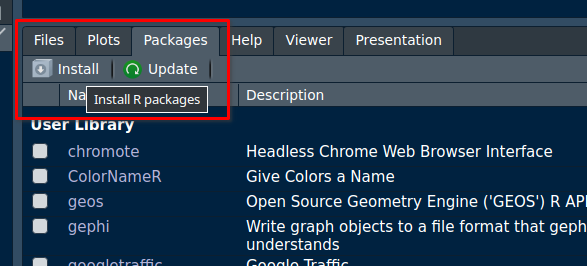
or by running the following code in the console:
install.packages("tidyverse")
install.packages("readxl")

install.packages("sf")
install.packages("mapview")
install.packages("rmarkdown")
install.packages("centr")
install.packages("od")
install.packages("openrouteservice")

install.packages(c("remotes", "devtools", "usethis")) # optional
install.packages("osmextract") # optional
install.packages("stplanr") # optional
WarningFacing problems installing packages on Linux?
It is possible that the instalation of the packages above fails due to missing dependencies. Unlike Windows or Mac, Linux sometimes tries to “build” packages from scratch, which causes errors if certain system tools are missing. To avoid this, follow the steps below to tell R to download ready-to-use packages instead of trying to build them.
- On the Terminal (next to the console, at the bottom of your screen, there is a tab called Terminal), run the command below to get your OS
codename:
# If you are using an Ubuntu original distro, get the value at 'codename'
lsb_release -a
# If you use other Ubuntu based distro (such as Linux Mint), get the value returned by the command below
source /etc/upstream-release/lsb-release && echo $DISTRIB_CODENAME - Back on the Console, run the following R code, making sure to replace ‘resolute’ with the codename retrieved in the previous step.
# Use pre-compiled binary packages to avoid errors due to missing dependencies
options(
  repos = c(CRAN = "https://packagemanager.posit.co/cran/__linux__/resolute/latest"),
  HTTPUserAgent = sprintf("R/%s R (%s)", getRversion(), paste(getRversion(), R.version["platform"], R.version["arch"], R.version["os"]))
)

# Disable bspm interception (use pre-compiled Linux binaries directly from Posit without needing apt or system privileges)
# install.packages(c("bspm"))
bspm::disable()- All set! Try to install the packages again. It should run smoothly now. :)
2.4 Cheat sheets
This is the only cheating allowed at this course. 😜
Cheath seets are a concise set of notes used for quick reference. Posit, the open-source data science software corporation responsible for RStudio/Positron IDEs, also makes available several cheat sheets that provide a comprehensive introduction to many of R softwares and packages.
You can start by taking a look at the ones for Positron or RStudio.
Refer to rstudio.github.io/cheatsheets for the full cheat sheet repository.
We will use Positron. Although if you prefer RStudio or already use other IDE such as VScode, that’s also fine.↩︎